Screenshots

App details
- Version
- 1.1
- Size
- 321.58 KB
- Updated
- March 10, 2017
- Requires
- Windows 2000
- Language
- English
- License
- Free
- Developer
- SoftArtStudio
- Category
- Windows OS
SoftPas in:
This product is also available in the following languages:
About Abander MP3 Lyrics Extractor
Download Abander MP3 Lyrics Extractor – Free Windows ID3 Tag Editor Tool
Introduction: Why a Dedicated Lyrics Extractor Still Matters
In a music‑centric world where streaming services dominate, many audiophiles still cherish their personal MP3 collections. Those collections are only as useful as the metadata that describes them—artist, album, genre, and especially lyrics. This is where Abander MP3 Lyrics Extractor steps in. First released in the early 2000s, the utility has survived multiple Windows generations, offering a lightweight, no‑cost solution for pulling lyrics and tag information from MP3 files. Its simplicity is its strength: a single‑click interface that reads embedded ID3 tags and extracts the lyrical content into a plain‑text file or directly into the MP3’s tag field.
Unlike modern, cloud‑based lyric services that require an internet connection, Abander works entirely offline, keeping your data private and your workflow fast. The program is particularly popular in regions such as Poland, Italy, and India, where users appreciate its small footprint (under 1 MB) and the fact that it runs on legacy systems like Windows 95. Even though the last official update (v1.1) dates back to 2006, the tool remains functional on current Windows versions thanks to its minimal reliance on external libraries.
For anyone looking to clean up a disorganized music library, batch‑process large numbers of files, or simply retrieve missing lyrics for karaoke or personal enjoyment, Abander MP3 Lyrics Extractor offers a secure, ad‑free experience. The following sections dive deep into its core features, installation steps, compatibility considerations, and the pros and cons that have kept it relevant for more than a decade.
Overview & Core Features: What the Extractor Actually Does
Abander MP3 Lyrics Extractor is categorized under Audio software → Organize → ID3 Tag Editors. Its primary purpose is to read existing ID3 metadata from MP3 files and extract the USLT (Unsynchronised Lyrics/Text) frame, which stores the song’s lyrics. The tool then gives users the option to save those lyrics as a separate .txt file or embed them back into a different MP3, facilitating easy sharing across devices.
Despite its age, the software packs a respectable set of capabilities that cater to both casual listeners and power users. Below is a concise feature list (marked up with itemprop="featureList") that highlights the most useful functions:
- Single‑click extraction of lyrics from the ID3v1 and ID3v2 tag structures.
- Batch processing: select multiple files or an entire folder for simultaneous extraction.
- Option to export lyrics as plain‑text files, preserving line breaks and encoding.
- Ability to re‑embed extracted lyrics into other MP3s, ensuring consistency across a library.
- Lightweight installer (under 1 MB) that leaves a minimal footprint on the hard drive.
- Full English language support with clear, jargon‑free UI labels.
- Compatibility with legacy Windows versions (Windows 95, 98, ME) while still running on Windows 10/11 in compatibility mode.
- No registration, registration‑free usage – truly free software.
- Secure offline operation: no internet access required, eliminating privacy concerns.
The tool does not claim to fetch missing lyrics from online databases; instead, it respects the integrity of the original tags. This design decision appeals to users who prefer to keep their music files self‑contained, especially when dealing with copyrighted material that cannot be legally altered via external services.
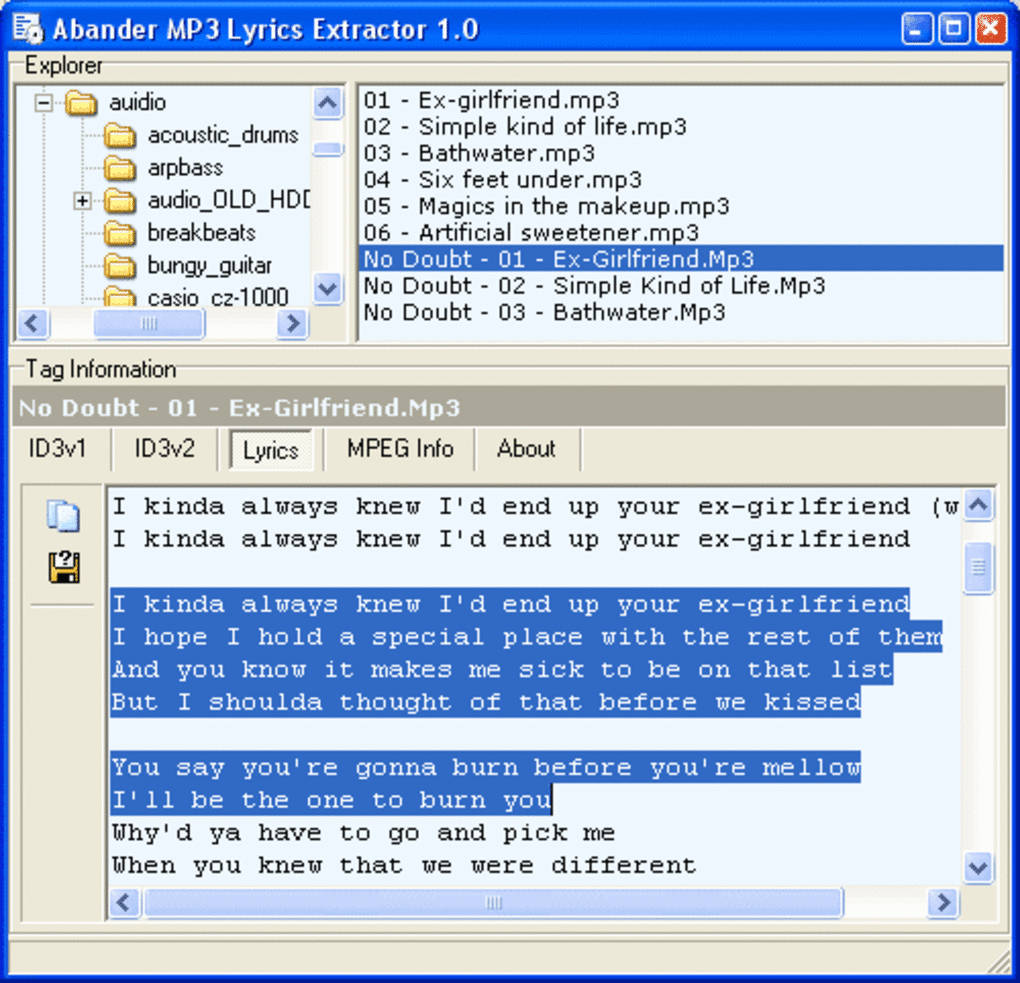
Beyond lyric extraction, Abander also displays basic tag information such as title, artist, album, track number, and genre. This read‑only view helps users verify that the correct metadata is present before performing any batch operations. While the feature set is modest compared to modern commercial tag editors, its focused approach ensures a low learning curve and fast execution.
Installation, Setup & Everyday Usage: Getting Started in Minutes
Installing Abander MP3 Lyrics Extractor is straightforward, reflecting its design philosophy of simplicity. Follow these steps to have the software up and running on a Windows machine:
- Download the installer: Click the “Download” button on the official page or a trusted software repository. The file is named
Abander_Lyrics_Extractor_v1.1.exeand is approximately 900 KB. - Run the executable: Double‑click the file. If you are on Windows 10/11, you may see a compatibility warning; choose “Run in compatibility mode for Windows 95/98” to avoid potential DLL issues.
- Accept the license agreement: The installer presents a simple EULA; click “I Agree” to continue.
- Choose the installation folder: By default, the program installs to
C:\Program Files\Abander. You can change this path if you prefer a custom location or need to install on a portable drive. - Complete the installation: Click “Install” and wait a few seconds. The installer will copy the executable and create a shortcut on the desktop.
- Launch the application: Double‑click the desktop icon or run
Abander.exefrom the installation directory.
Once opened, the user interface presents three main panels: a file browser on the left, a tag preview in the center, and an action toolbar at the top. To extract lyrics, simply drag and drop one or more MP3 files into the file browser, then press the “Extract Lyrics” button. A dialog will ask whether you wish to save the lyrics as a .txt file, embed them back into a target MP3, or both. Choose the appropriate option and specify the destination folder.
For batch operations, you can select an entire folder by clicking the “Browse” button and navigating to the desired directory. The program will recursively scan subfolders, list all MP3s, and display any detected lyrics in the preview pane. After confirming the list, click “Export All” to generate a set of text files matching the original filenames (e.g., songname.txt).
Because the software works offline, there are no background updates or internet checks that could slow down the process. However, if you run the program on a newer Windows version, you may want to periodically check the developer’s site for community‑maintained patches that address minor UI glitches on high‑resolution displays.
Overall, the installation experience is virtually hassle‑free, and daily usage requires just a few clicks—making it ideal for users who need quick lyric retrieval without learning a complex suite of tools.
Compatibility, Pros & Cons: Is It Right for Your Setup?
Abander MP3 Lyrics Extractor officially supports Windows 95 and later, including Windows 98, ME, 2000, XP, Vista, 7, 8, and 10/11 when run in compatibility mode. The program is a 32‑bit application, which means it runs natively on both 32‑bit and 64‑bit Windows systems. Because it does not rely on modern .NET frameworks or external libraries, you can even execute it on a virtual machine or a legacy PC without internet connectivity.
Below is a balanced look at the strengths and weaknesses of the tool, presented as separate lists to aid quick decision‑making:
Pros
- Ultra‑light footprint: Under 1 MB installation size, leaving ample disk space for large music libraries.
- Free and ad‑free: No hidden fees, no trial period, and no intrusive advertisements.
- Offline operation: Guarantees privacy; no data is sent to external servers.
- Legacy support: Works on Windows 95/98, making it a rare tool for vintage hardware enthusiasts.
- Batch processing capability: Saves time when handling hundreds of MP3 files.
- Simple UI: Minimal learning curve, suitable for users of any technical level.
- Export flexibility: Allows saving lyrics as plain text or embedding them back into other files.
Cons
- Outdated interface: The look and feel resemble early‑2000s software, which may feel dated to modern users.
- Lack of active development: No official updates since 2006; security patches rely on community workarounds.
- No online lyric search: Cannot fetch missing lyrics from internet databases.
- Limited format support: Only handles MP3 files; does not work with FLAC, AAC, or other popular audio formats.
- Basic tag editing only: Provides read‑only tag view; does not allow comprehensive editing of all ID3 fields.
When weighing these points, consider your primary use case. If you need a no‑frills, secure way to extract existing lyrics from a large MP3 collection, the pros outweigh the cons. However, if you require a modern UI, multi‑format support, or automatic lyric fetching, you may need to look at newer alternatives.
Conclusion & Frequently Asked Questions
Abander MP3 Lyrics Extractor remains a niche but valuable tool for users who prioritize privacy, low system impact, and offline capability. Its free nature and ability to run on very old Windows installations make it a unique asset in the crowded landscape of audio metadata editors. While the UI may feel nostalgic and the feature set is intentionally limited, the program delivers exactly what it promises: quick, reliable extraction of embedded lyrics from MP3 files.
If you’re ready to tidy up your music library, improve karaoke sessions, or simply preserve the lyrical content of your favorite tracks, download Abander MP3 Lyrics Extractor today. Click the download button, follow the simple installation steps, and you’ll have a functional lyric extractor within minutes. Remember to run the application in compatibility mode on newer Windows versions for the smoothest experience.
Frequently Asked Questions
Can Abander MP3 Lyrics Extractor retrieve lyrics that are not already embedded in the MP3?
No. The tool only extracts lyrics that are already stored in the ID3 tag of the MP3 file. It does not search online databases for missing lyrics.
Is the software compatible with Windows 10 and Windows 11?
Yes. Although the program was built for Windows 95, it runs on Windows 10/11 when launched in compatibility mode (e.g., Windows 95/98).
Can I extract lyrics from multiple MP3 files at once?
Absolutely. The batch‑processing feature lets you select a folder, and the program will extract lyrics from every MP3 it finds, saving each as a separate .txt file if you choose.
Does the application modify the original MP3 files?
By default, extraction is read‑only and does not alter the source files. You can optionally embed the extracted lyrics into a different MP3, but the original file remains unchanged unless you explicitly choose to overwrite it.
Is there any cost or registration required?
No. Abander MP3 Lyrics Extractor is completely free, with no registration, subscription, or hidden fees.
Guides & Tutorials
How to install Abander MP3 Lyrics Extractor
- Click the Download button above.
- Once redirected, accept the terms and click Install.
- Wait for the Abander MP3 Lyrics Extractor download to finish on your device.
How to use Abander MP3 Lyrics Extractor
This software is primarily used for its core features described above. Open the app after installation to explore its capabilities.
User Reviews
No reviews yet. Be the first to share your experience.
You may also like
more
Llama 2
Free-to-use large language model As the new addition to Meta’s arsenal of langua...

NotebookLM
Revolutionizing the note-taking and idea-generation process NotebookLM is an exp...

Github co pilot
AI-inspired software development and coding platform GitHub Copilot is a browser...

Google Gemma
Google’s lightweight AI models Introducing Google Gemma , a family of cutting-ed...

AI Image Enlarger
A free app for Windows, by ai-image-larger. AI Image Enlarger is a free software...

DALL E
AI-driven text-to-image transformation engine DALL·E is a free graphic and desig...